Answer calls 24/7 with the best AI receptionist

Avoid missed calls and opportunities with Sona, Quo's 24/7 AI virtual receptionist. Sona answers calls, takes messages, books appointments, and texts callers — right inside your business phone system. No extra tools. No separate dashboard. Everything in your Quo inbox.

Try Quo and Sona free for seven days

Get started today
Trusted by over 90,000 businesses
"Highest Satisfaction" business phone system (VoIP), rated by 3,200+ reviews G2

See how Sona’s AI receptionist delivers a better customer experience

Sona greets callers, answers common questions, and captures messages at a fraction of the cost of traditional answering services.

Hear Sona in action
What your team sees
What your team sees:
Answering service: Call summary from Sona where a customer reported a sprinkler issue
What your team sees:
Chatbox titled 'Rent payment option' with AI summary and transcript link, explaining rent can be paid online via tenant portal using credit card or ACH transfer, or by mailing or dropping off a check.
What your team sees:

Your always-on AI agent

Sona is a 24/7 AI front desk for your team.
Set up your custom AI receptionist in minutes, no technical expertise needed.

Never miss a call

Avoid lost leads or disappointed customers. Whether a call comes in during peak hours at 3 p.m. or 3 a.m., Sona can take it for your team. 

Save time for your team

AI voice agents like Sona can handle multiple calls simultaneously, reducing the need to add more support reps. Sona can also send text messages with booking links, confirmations, or next steps automatically — before the call ends.

Offer live help in real time

Instruct Sona when to transfer calls to your team. Review Sona’s calls and the rest of your conversation history with customers in your Quo inbox.

Integrate with 8,000+ apps

Connect Sona with the rest of your tech stack. Sync Sona calls and texts with HubSpot, Salesforce, Jobber, Zapier, and Make. Build custom integrations with the Quo API.

Serve callers in their language

Sona speaks English, Spanish, and French, so your team can serve more customers even when multilingual staff are busy or off for the day. Set Sona's language in your call flow settings in minutes.

How an AI receptionist pays for itself

Portrait of a man with dark hair wearing a suit and white shirt, with a blurred outdoor background.
“With Sona, I never worry about missing a call again. It’s like having a smart, reliable assistant who always picks up. It’s professional, friendly, and on it 24/7.”
Christopher Sands, CEO
Logo with text 'HANNON ✣ DePALMA' in bold white letters on a black background.

Customize your AI virtual receptionist to work for you 

Train Sona to understand your business and customer needs.

Easily add Sona into call routing

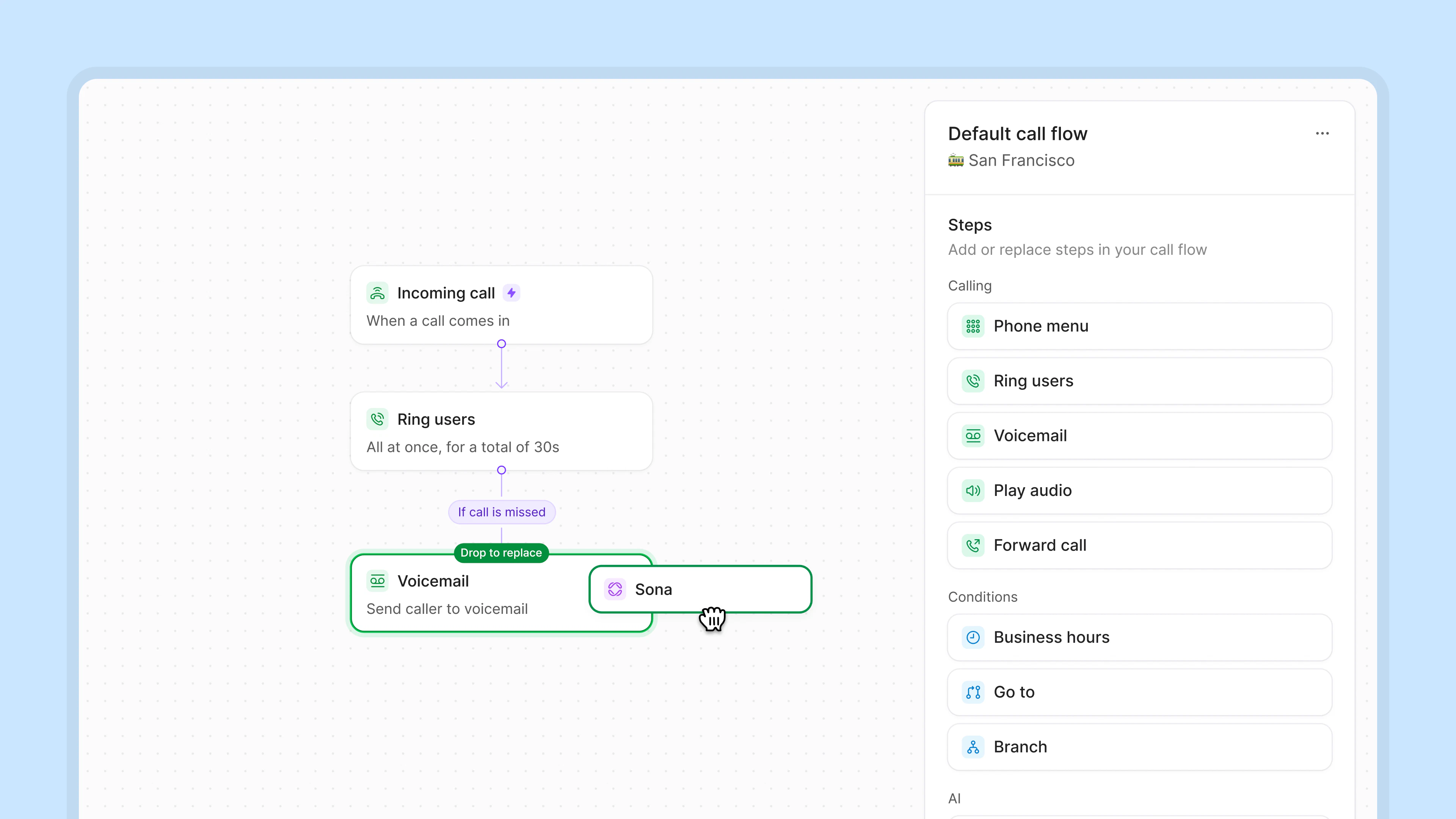
Add Sona directly to your existing call flows in our call flow builder. Sona can handle routine calls both during business hours and after hours.

Call flow diagram showing an incoming call ringing users simultaneously for 30 seconds, with a missed call leading to voicemail or a Sona option being dragged to replace voicemail.

Make Sona an expert in your business

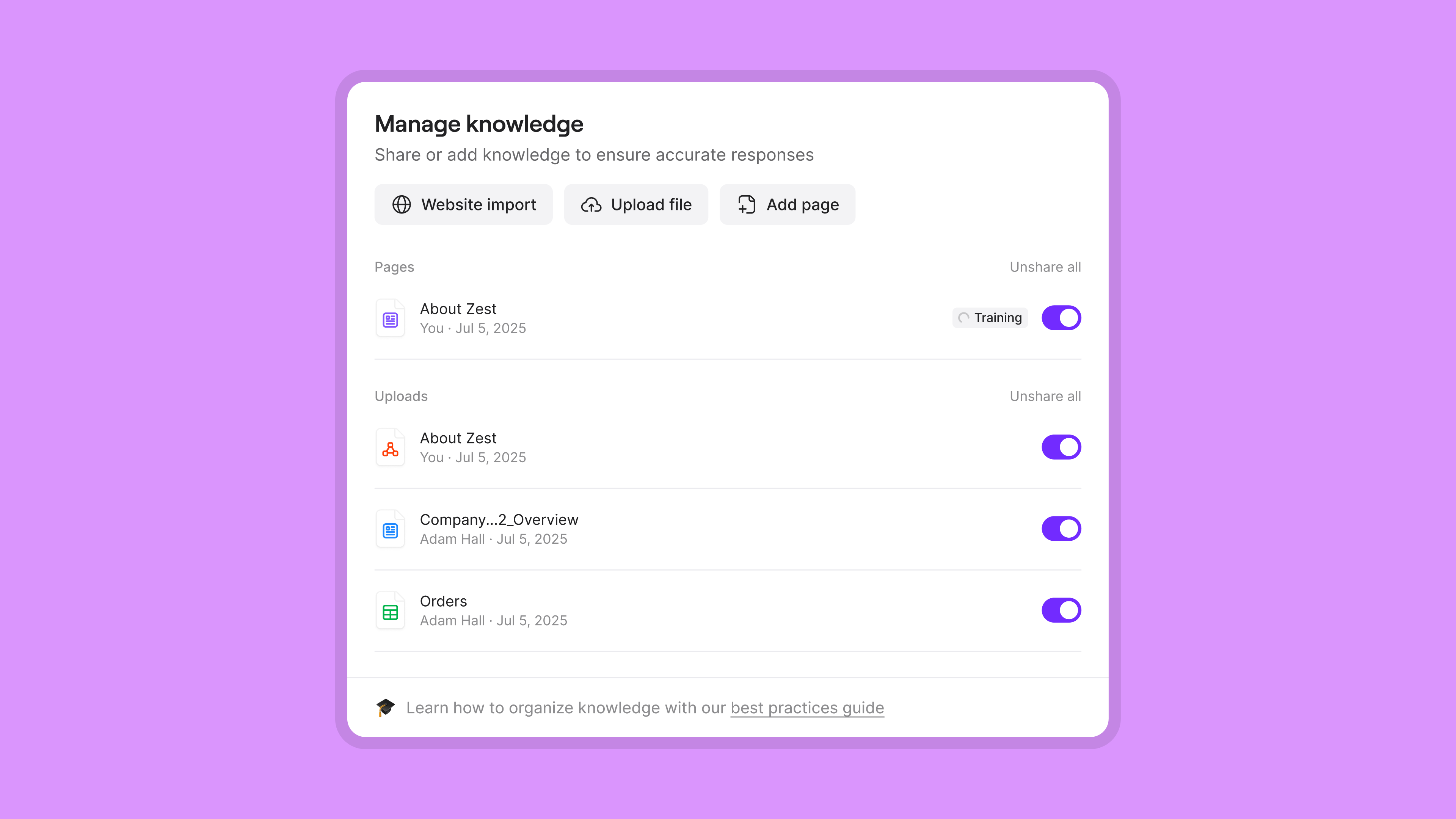
Share key information about your business with Sona during onboarding. Provide your website URL, upload PDFs, or create custom documents manually. Sona learns about your business instantly.

Give Sona custom conversation workflows

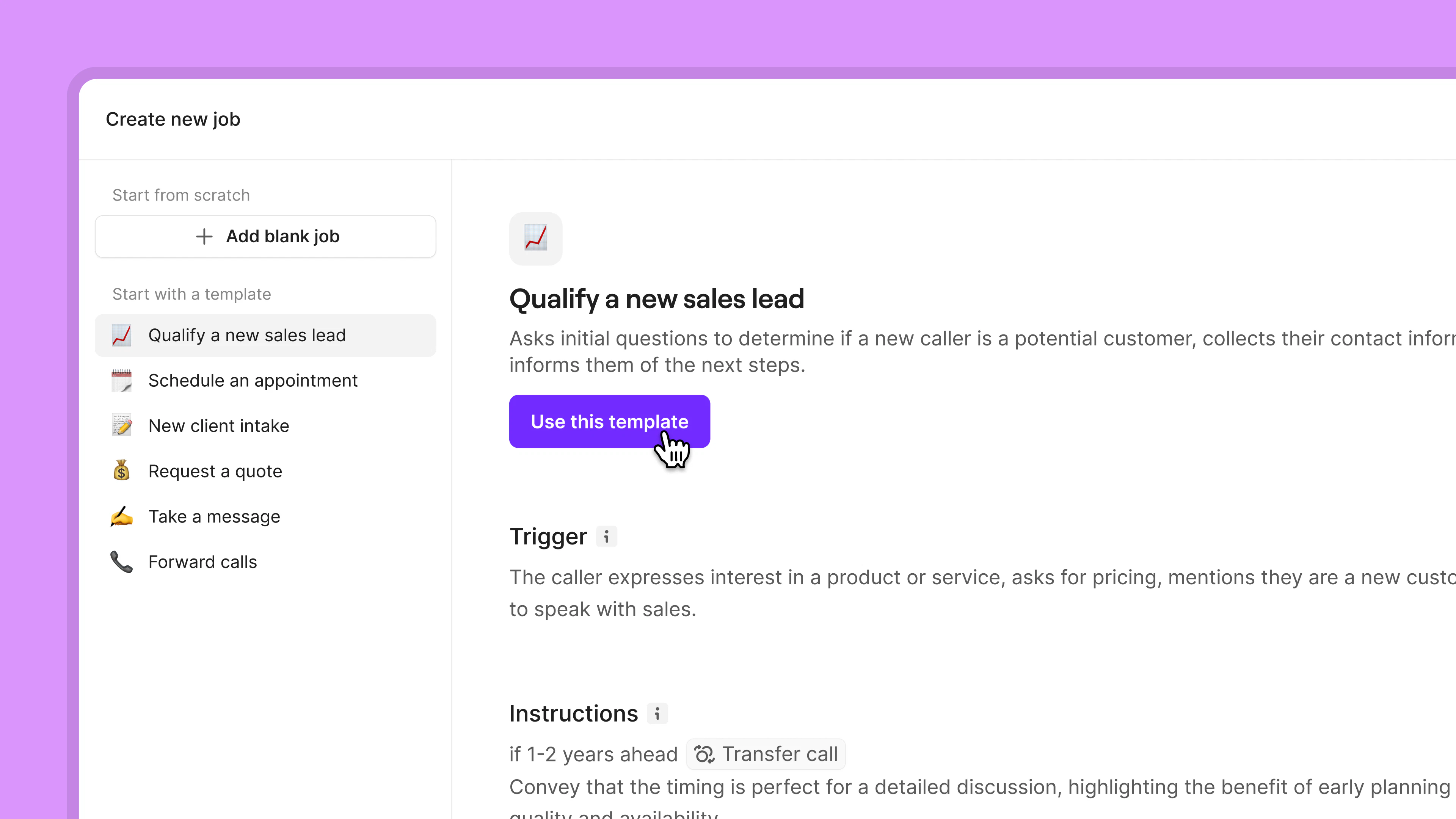
Tell Sona how to handle different types of calls, like lead qualification and appointment scheduling, with our pre-built templates. You can also easily create new conversation flows from scratch based on your business needs.

For example, let’s say a new customer wants to get a quote for a service from your business. You can instruct Sona to collect the customer’s name, address, desired service, and any details that make it easier for your team to provide an accurate pricing quote.  

Or let's say a caller wants to book a service. Sona can collect their name, preferred time, and contact details — then automatically text them a booking link before the call ends. No back-and-forth. No manual follow-up.

User interface screen for creating a new job with templates like Qualify a new sales lead, Schedule an appointment, and more, highlighting the Qualify a new sales lead template with a purple button labeled Use this template.

Review Sona’s AI phone calls instantly

View Sona’s call summaries, transcripts, and messages in your Quo inbox right after a call ends. You can also quickly get call logs in your CRM.  Use our native HubSpot, Jobber, and Salesforce integrations. Plus, build a custom one with the Quo API.

Automate your call transfers with Sona

When a caller needs a human touch, Sona can transfer the call directly to the right teammate. No dead ends, no frustrating loops.

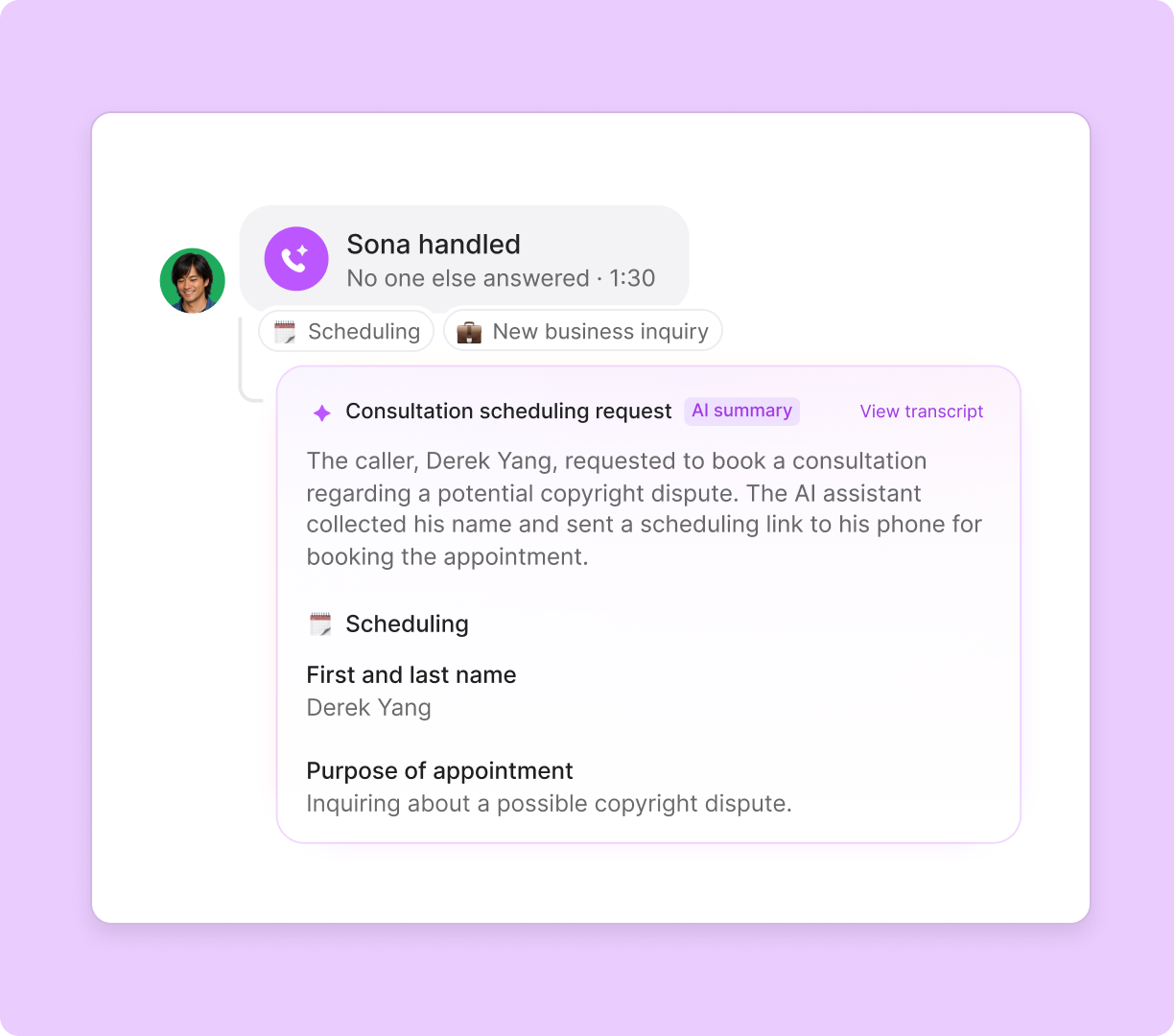
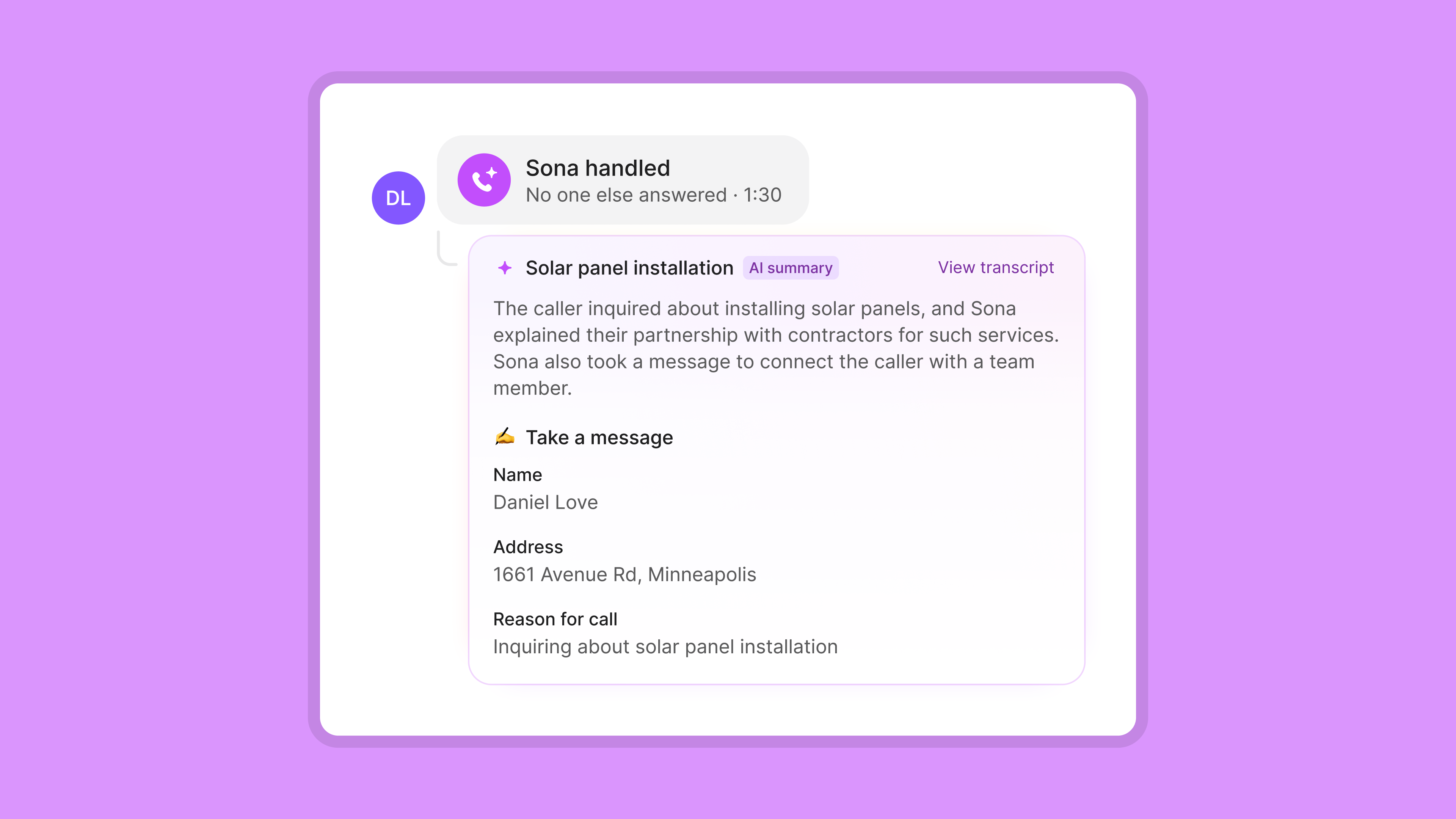
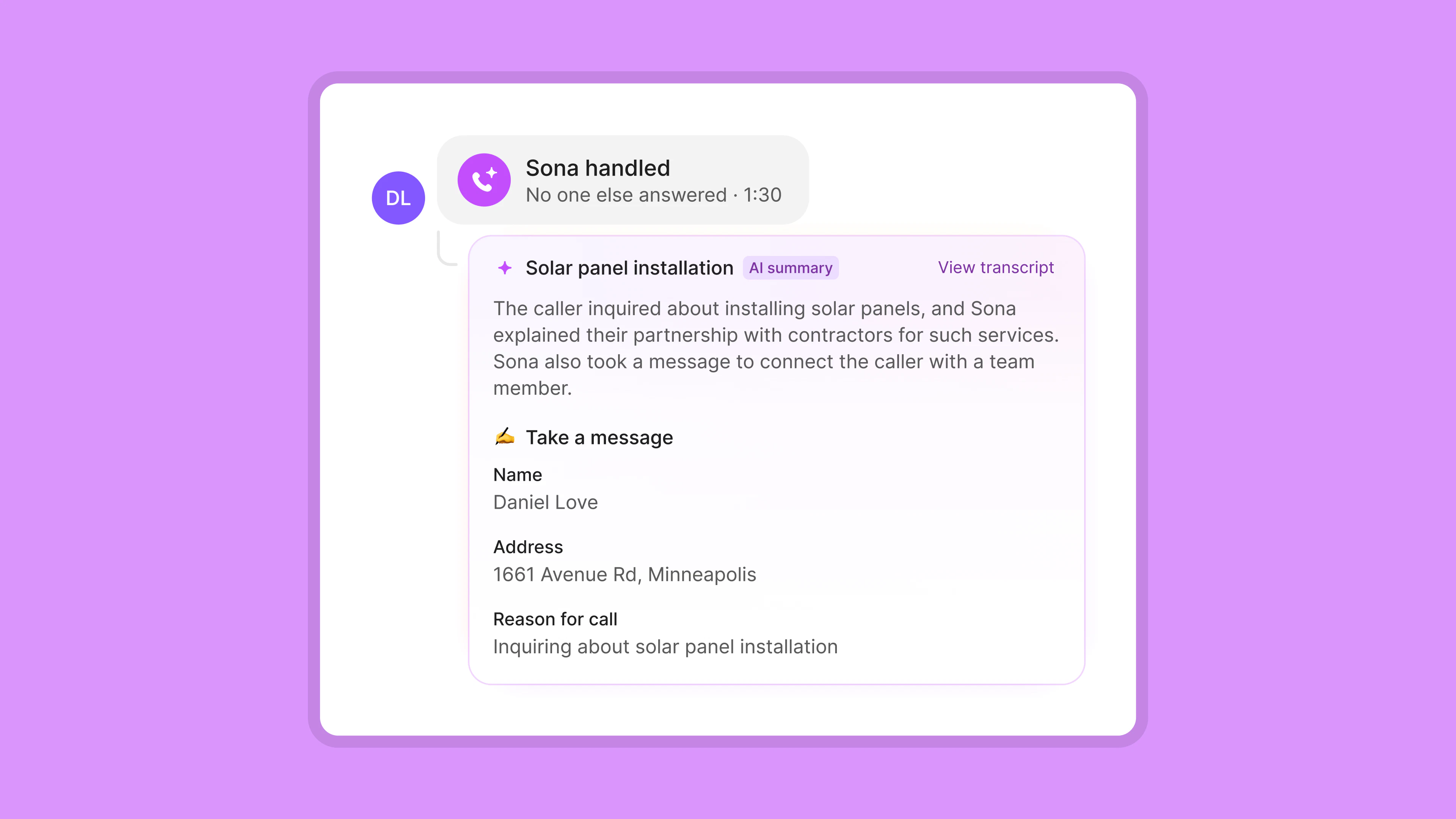
Screenshot of a call summary where Sona handled a 1:30 call about solar panel installation, with a message taken for caller Daniel Love from 1661 Avenue Rd, Minneapolis, inquiring about installation.
ai icon

Save time with AI

Give your workflow a boost with Quo AI

Automatic call transcripts

Read conversations in detail and quickly find information with time-stamped call transcripts.

A black screen with a chat box that says "Angela Campbell" on the top left.
Suggested contacts

Easily add new contacts with suggestions based on call and voicemail transcripts.

A contact suggestion button with a phone number and name.
Call summaries and next steps

Quo AI automatically summarizes calls, then intelligently suggests next steps.

Call ended notification showing answered call duration of 9 minutes 30 seconds and a purple button labeled Call summary.
Automatic call transcripts

Read conversations in detail and easily reference or find info with time-stamps.

User interface showing a call transcript with timestamps and short text snippets in a vertical list, featuring a purple button labeled 'Call transcript' at the top left.
Suggested contacts

Easily add new contacts with suggestions based on call and voicemail transcripts.

User profile placeholder icon above call, lock, and user icons on a white interface with a purple 'Contact suggestion' label.
AI call tags

Define your tags, and our AI automatically adds them to relevant calls—so you stay focused on what matters.

User interface showing a call ended at 15:29 answered by Ruth, with audio playback controls and tags labeled 'Issue resolved,' 'Feedback,' and 'Positive 85%'.

How to set up Sona’s virtual AI receptionist in five steps

  1. Sign up for a Quo free trial
    Get started with a free trial for seven days. During your trial, you can also try Sona free.
  2. Add Sona to your call flows
    Drag and drop Sona in our no-code call flow builder.
  3. Upload your company information
    Share your website URL and any relevant documentation.
  4. Create custom jobs for Sona
    Customize how your AI virtual receptionist handles different types of calls. 
  5. Test and go live with your AI receptionist
    Run a series of demo calls with Sona before assigning it to your live calls.
A phone call is displayed on a screen.A conversation between two people on a messaging app.

See how Sona’s AI receptionist can deliver results for your business

Electrician

  • Book more jobs with 24/7 availability
  • Record job updates after business hours
  • Connect to a live team member in emergencies

HVAC

  • Record after-hours job updates
  • Let customers request maintenance appointments anytime
  • Route urgent repairs to on-call technicians

Legal

  • Conduct new client intake faster for your law firm
  • Take down detailed messages when your team is busy
  • Transfer clients to an available attorney in emergencies

Property management

  • Conduct new tenant intake faster
  • Record tenant availability for unit viewings
  • Transfer callers to specific departments depending on the request

Real estate

  • Qualify new client leads faster
  • Collect client availability for property visits
  • Route high-priority inquiries to listing agents or mortgage specialists

Salon

  • Book more appointments with 24/7 availability
  • Answer questions about your business hours and service offerings
  • Record appointment changes automatically

No hidden fees

Find out how much you’re investing in your business phone solution upfront on our pricing page.

View pricing

Frequently asked questions

Can’t find the answer here? Check out our Resource Center.

What is the Sona AI receptionist?

The Sona AI receptionist, also known as an AI virtual receptionist, is a call answering service that answers incoming calls for a business. It performs the function of a human receptionist by: 

  • Answering common questions
  • Taking messages
  • Booking appointments
  • Handling appointment reschedules and cancellations

Unlike an in-house receptionist, however, it's completely automated and available 24/7 to receive calls.

What can the Sona AI receptionist do?

Sona handles the full range of inbound call tasks your front desk manages around the clock. Here's a breakdown of everything the AI handles:

  • Answer calls and respond to questions. Sona greets callers and answers common questions about your business using a knowledge base you build from your website URL, uploaded PDFs, or custom documents you write manually. It learns your services, hours, pricing, policies, and anything else you want callers to know — and gives accurate, specific answers instead of generic responses.
  • Take detailed messages. When a caller wants to leave information or has a question Sona can't answer, Sona collects their name, contact details, and the reason for their call. The message appears in your Quo inbox immediately after the call ends, along with a full summary and transcript.
  • Capture leads and qualify new clients. You can configure Sona with custom conversation workflows — called jobs — that tell it exactly what information to collect from different types of callers. For example, Sona can ask a new lead for their name, address, the service they need, and any details that help your team follow up quickly.
  • Send texts during a call. Sona can send an SMS to the caller while the call is still active. This is how Sona handles appointment scheduling — it collects the caller's details and texts them a booking link before the call ends. It can also send confirmation messages, follow-up instructions, or any link the caller requests, without any manual follow-up from your team.
  • Transfer calls to the right person. When a caller needs a human, Sona transfers the call directly to the right teammate — with a call summary attached, so your team knows exactly why the caller is reaching out before they pick up. You decide the rules: which scenarios trigger a transfer, and who the call goes to. For example, you can tell Sona: “If they say their request is urgent, then offer to transfer their call to your team.”
  • Log calls in your CRM automatically. Every call Sona handles is logged in your Quo inbox and can be automatically synced to HubSpot, Salesforce, Pipedrive, or Jobber using Quo's native integrations. Call summaries, transcripts, and recordings are included, so nothing falls through the cracks.
  • Handle both business hours and after-hours calls. Sona plugs directly into your call flow using Quo's drag-and-drop call flow builder. You can set Sona to handle calls during business hours, after hours, or both — without changing the rest of your call routing.
  • Speak with callers in English, Spanish, or French Sona currently supports English, Spanish, and French, so you can serve more customers in the language they're most comfortable with. Language is set in your call flow configuration.
How is an AI receptionist different from an answering service or IVR?

An AI receptionist uses conversational AI to understand what callers need and respond naturally, instead of relying on scripted menus or human message-taking. Unlike traditional answering services or IVRs, it can answer questions, qualify leads, book appointments, and route calls intelligently — all instantly and available 24/7.

How does the Sona AI receptionist work?

Sona brings together artificial intelligence, speech recognition, large language models, and natural language processing technologies ‌‌to provide a high-quality customer experience.

Sona turns speech into text, identifies the specific question or request, and uses AI-powered reasoning capabilities to respond. Next, it turns text responses into speech using text-to-speech software or AI voice models to communicate with customers.

This process is similar to how AI chatbots like ChatGPT or Claude work. The difference is Sona can access your company's information, so it can give customers accurate and specific information about your business.

How much does an AI receptionist cost?

The cost of an virtual receptionist often depends on how many calls it handles for your business every month. Most AI receptionist solutions charge a monthly fee or a per-minute fee for calls handled by their tools. These offerings start at around $100 per month for a fixed bundle of calls, after which they charge you by the minute.You can try Sona for free. 10 calls are included each month in the free plan. Choose from multiple pricing tiers starting at $25 per month depending on how many calls you need Sona to handle each month. Sona is billed per call, not per minute — so your costs are predictable. Calls under 15 seconds don't count toward your usage. Bonus: Find out more about the best AI phone answering services.

How do I choose an AI receptionist?

Choose an AI receptionist based on three factors: cost, customization, and connectivity:

  1. Cost: If you choose the wrong provider, AI voice agents can be very expensive for your business. Many tools bill you by the minute, which can add up over time. Find a provider that bills you per call so that you have more visibility into your usage. 
  2. Customization: Choose a provider that gives you the flexibility to train your AI receptionist and makes it easy. You shouldn’t have to manually create your receptionist’s knowledge pages from scratch. Prioritize providers that let you share a website URL or upload documents. That way, you can finish setting up your AI receptionist quickly. 
  3. Connectivity: Choose an AI receptionist that lives inside your business phone. Toggling between your phone and your receptionist can be a hassle and adds work for your team. AI receptionists like Sona automatically log calls in your business phone inbox. Plus, they share call recordings and summaries with your CRM so that you don’t lose track of any conversations. 
What is the best AI receptionist for small businesses?

We’re biased, but we believe that the best AI receptionist for small businesses is Sona. It can answer common questions, take down detailed messages, is easy to set up, and is cost-effective for small teams. Plus, it’s 100% integrated in your business phone, so you have full visibility into its performance at all times. 

Do I need to be tech savvy to set up Sona?

No, Sona is designed to be set up with zero technical expertise. Simply drag and drop it into your existing call flows. You can provide custom instructions and your company documentation to Sona’s knowledge base in the call flow builder.

Learn how you can train and customize Sona.

Is Sona trained on my data?

No, the information you provide to Sona isn't used to train its AI models. Your business information remains private and is only used to answer questions from your callers.